
Copy a web table to Excel, and see what you are getting first.
Tablekit finds the tables and lists on the page, shows you a preview with the problems called out (merged cells, empty rows, footnote markers, rows not loaded yet), and exports clean CSV, Excel, Markdown or JSON, or copies it for pasting into Excel or Google Sheets.
We do not store your data on our servers. Free, no account. The table never leaves your browser. Store listings are in review; install from the files in about a minute (steps below).
- 1. Open a page with a tableClick the Tablekit icon. It lists every table and list it found, with a small preview. Or point at one with the mouse.
- 2. Check the previewWarnings tell you what was merged, removed or renamed. Untick or rename columns, add link URLs, turn "$1,200" into 1200.
- 3. ExportCopy for Excel or Sheets, or save CSV, TSV, Markdown, JSON, or (Pro) an Excel workbook.
What it finds
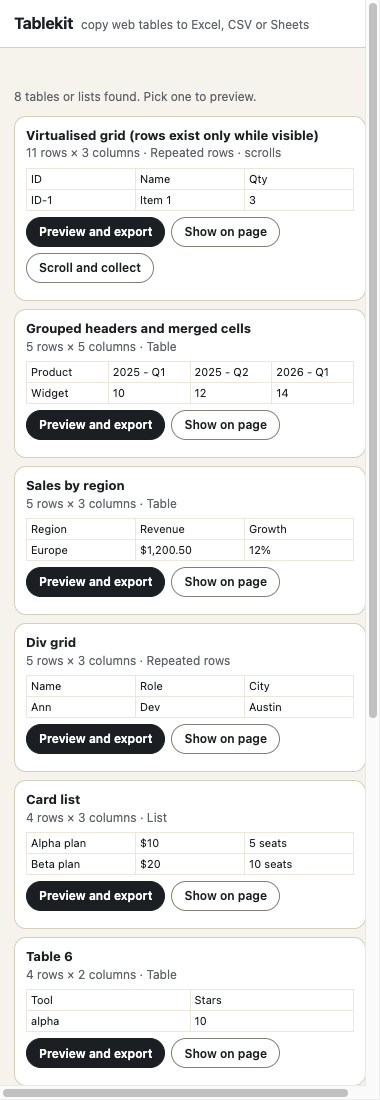
Not only <table> tags. Tablekit also recognises:
- Grids built from divs, the "tables" that are really rows of boxes.
- ARIA grids used by data-heavy web apps.
- Card lists such as a pricing or product list.
- Tables inside iframes and shadow DOM, which a plain copy often misses.
- Layout tables that only hold other tables are ignored, so the list stays useful.
Long grids that load rows as you scroll are flagged, and (Pro) Scroll and collect gathers all of them.
See the problems before they reach your spreadsheet
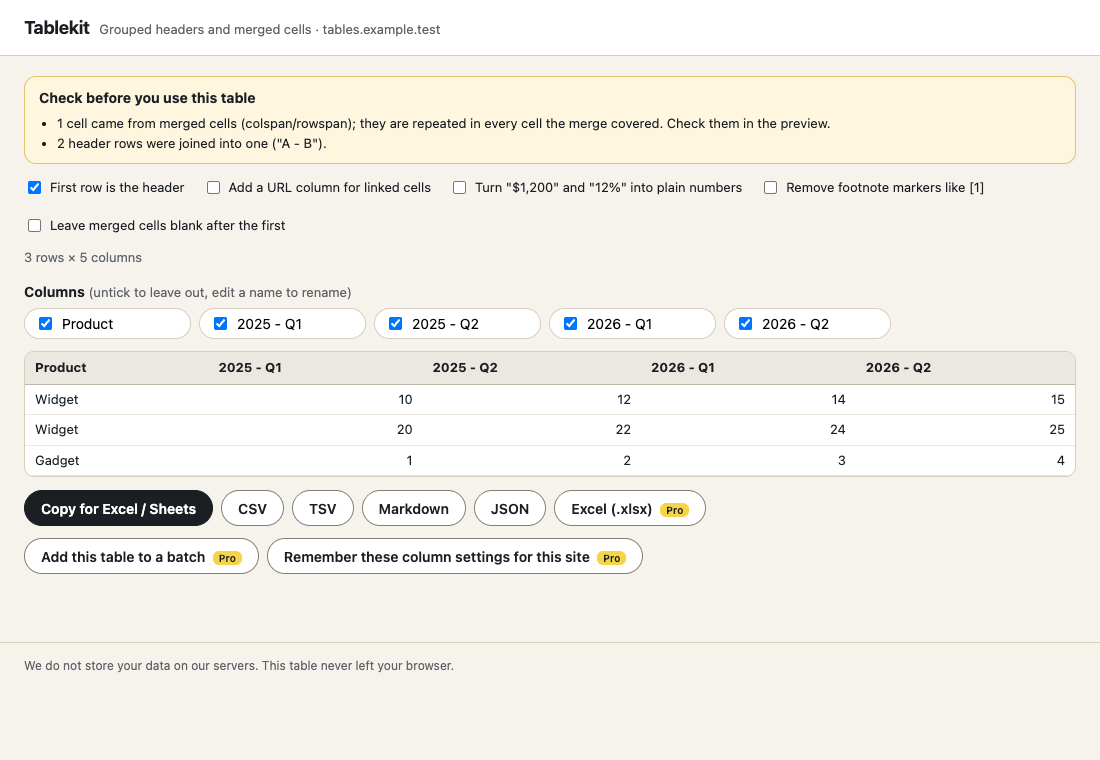
Grouped header rows are joined into one ("2025 - Q1"). Merged cells are repeated or left blank, your choice, and counted in a warning. Empty rows and columns are removed and reported. Duplicate headers are numbered so every column has a unique name.
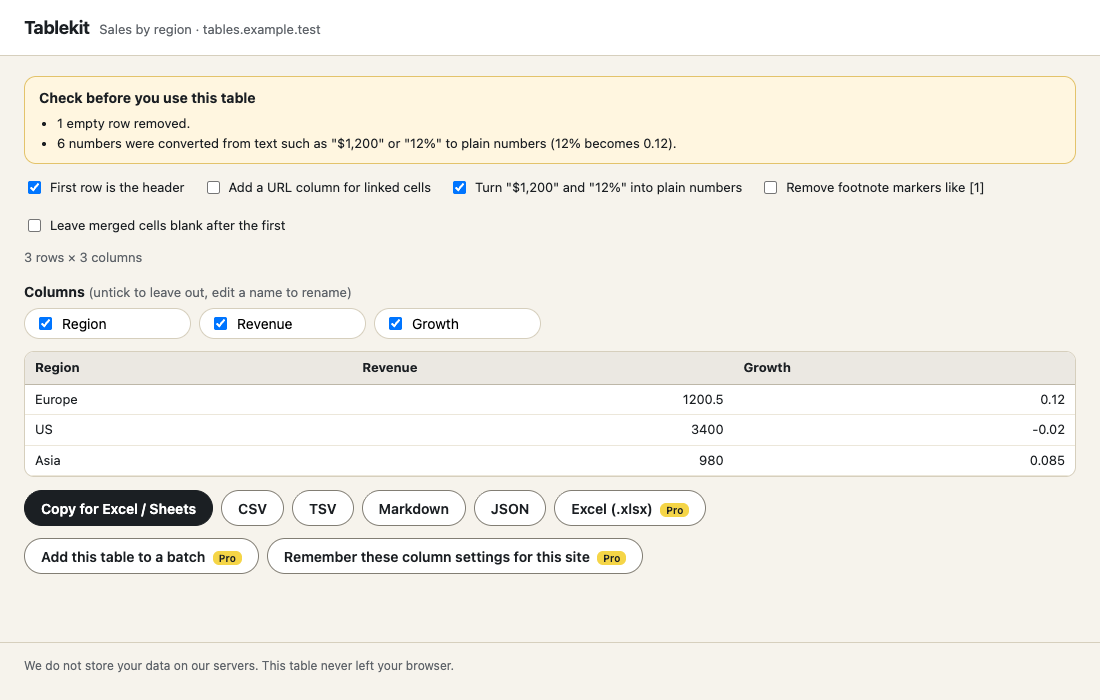
Numbers that arrive as text ("$1,200.50", "12%", "(2%)") can be converted to plain numbers so Excel can add them up. CSV files include a byte-order mark so accented characters open correctly, and cells that start with = or @ cannot run as formulas.
Free
- Capture any one table, unlimited
- Preview, warnings, column picker and rename
- CSV, TSV, Markdown, JSON
- Copy for Excel / Google Sheets
- Works in Chrome and Firefox
Pro $29 $14.50 once \u00b7 50% off until Oct 25
- Excel (.xlsx) export with a Source sheet
- Capture every table on the page into one workbook
- Scroll and collect for long and lazy-loaded grids
- Saved column settings per site
- Works in up to 3 browsers
Thanks. Your licence key is on the receipt. In the extension click \u201cHave a Pro key? Unlock\u201d, paste it and press Unlock.
Install in a minute
Chrome, Edge, Brave: unzip the file, open chrome://extensions, switch on Developer mode, press \u201cLoad unpacked\u201d and choose the folder.
Firefox: unzip the file, open about:debugging#/runtime/this-firefox, press \u201cLoad Temporary Add-on\u201d and choose manifest.json. Temporary add-ons are removed when Firefox restarts; the Add-ons listing removes that limit.
Questions
Do you store my data on your servers?
No. We do not store your data on our servers. Tablekit reads the table in your browser, shows it in a preview page that belongs to the extension and builds your file on your device. The only thing it sends us is, for Pro, your licence key (to unlock, to check it once a day and to release a browser); we pass it to our payment provider and do not keep it in a database of ours.
What kinds of tables can it capture?
Ordinary HTML tables, ARIA grids, the "tables" that are really rows of divs, card lists, tables inside iframes and tables inside shadow DOM. Layout tables that only hold other tables are ignored, and tiny two-by-two tables are skipped. If a page is unusual and is not found automatically, point at it with the mouse picker.
How is it different from copying and pasting?
You see the result before you use it. Tablekit warns about merged cells, empty rows and columns, duplicate or empty headers, footnote markers like [1], and tables that scroll inside the page, so you do not discover missing rows later. Grouped header rows are joined into one ("2025 - Q1"), numbers stored as text such as "$1,200" or "12%" can be turned into plain numbers, and CSV files open correctly in Excel with accents intact.
Is the free version limited?
No time or count limit. Capture, preview, every cleaning option, CSV, TSV, Markdown, JSON and Copy for Excel / Sheets are free. Pro adds the things that save time on repeated work: Excel (.xlsx) with a Source sheet, several tables in one workbook, scroll-and-collect for long grids, and saved column settings per site.
What about long tables that load as you scroll?
A normal capture only sees the rows the page has loaded, and Tablekit tells you when a table scrolls inside the page. Scroll and collect (Pro) scrolls it for you and gathers every row, without duplicates. If a page needs a "Load more" button, press it first and capture again.
Will CSV files run formulas in Excel?
No. Cells that start with = or @ (or a + or - followed by a letter) get a leading apostrophe so a spreadsheet keeps them as text. Real numbers and phone numbers such as -5 or +1 555 0100 are left exactly as they are.
Does it work on pages behind a login?
Yes. It reads the page you are looking at, so anything you can see while signed in can be captured. Only use it on data you are allowed to copy.
Chrome and Firefox?
Both. The Chrome Web Store and Firefox Add-ons listings are in review, so for now you can install the files from this page in a minute.
See the privacy policy and terms. Tablekit is an independent tool and is not affiliated with Microsoft, Google or any website you capture from. Only capture data you are allowed to copy.