
Know exactly what changed on a web page, not just that something did.
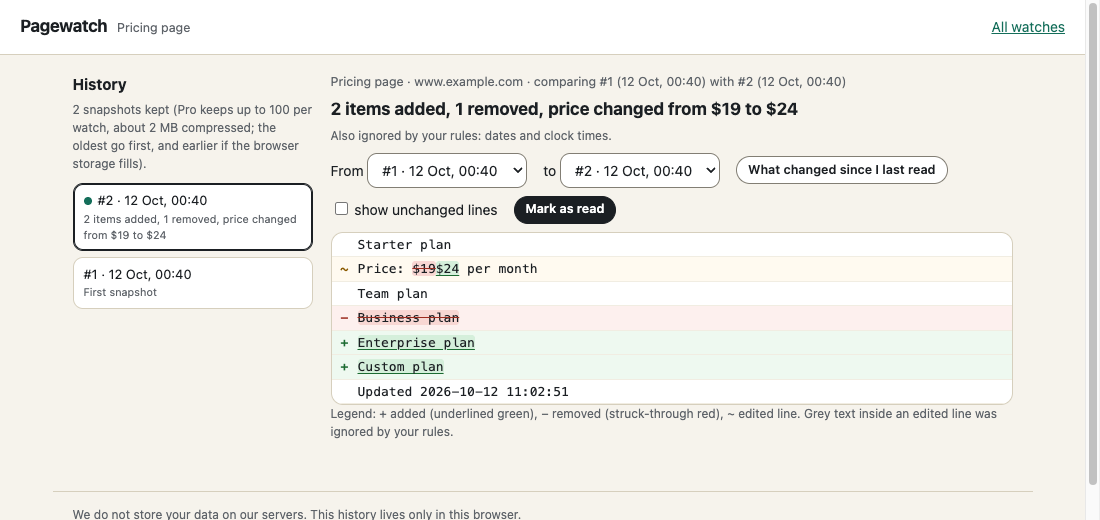
Point at the part of a page you care about, such as a price, a stock notice, a policy section or a list. Pagewatch checks it from your browser and tells you what changed in a sentence: "2 items added, 1 removed, price changed from $19 to $24". Timestamps, counters and re-ordered lists are ignored, so an alert means something.
We do not store your data on our servers. Free, no account. Store listings are in review; install from the files in about a minute (steps below).
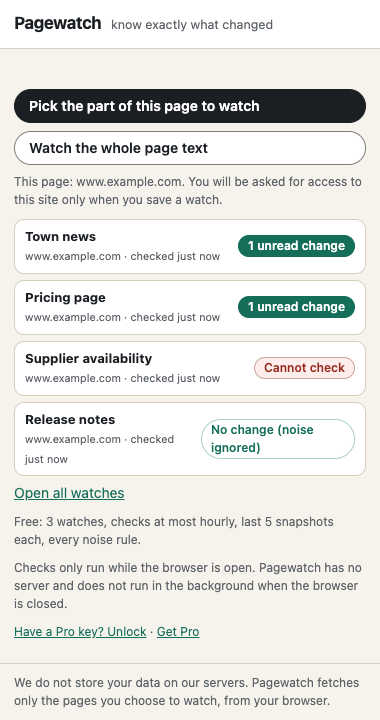
- 1. Pick the partClick the Pagewatch icon, then click the part of the page to watch (or watch the whole page text). Widen or narrow the selection and see the exact text.
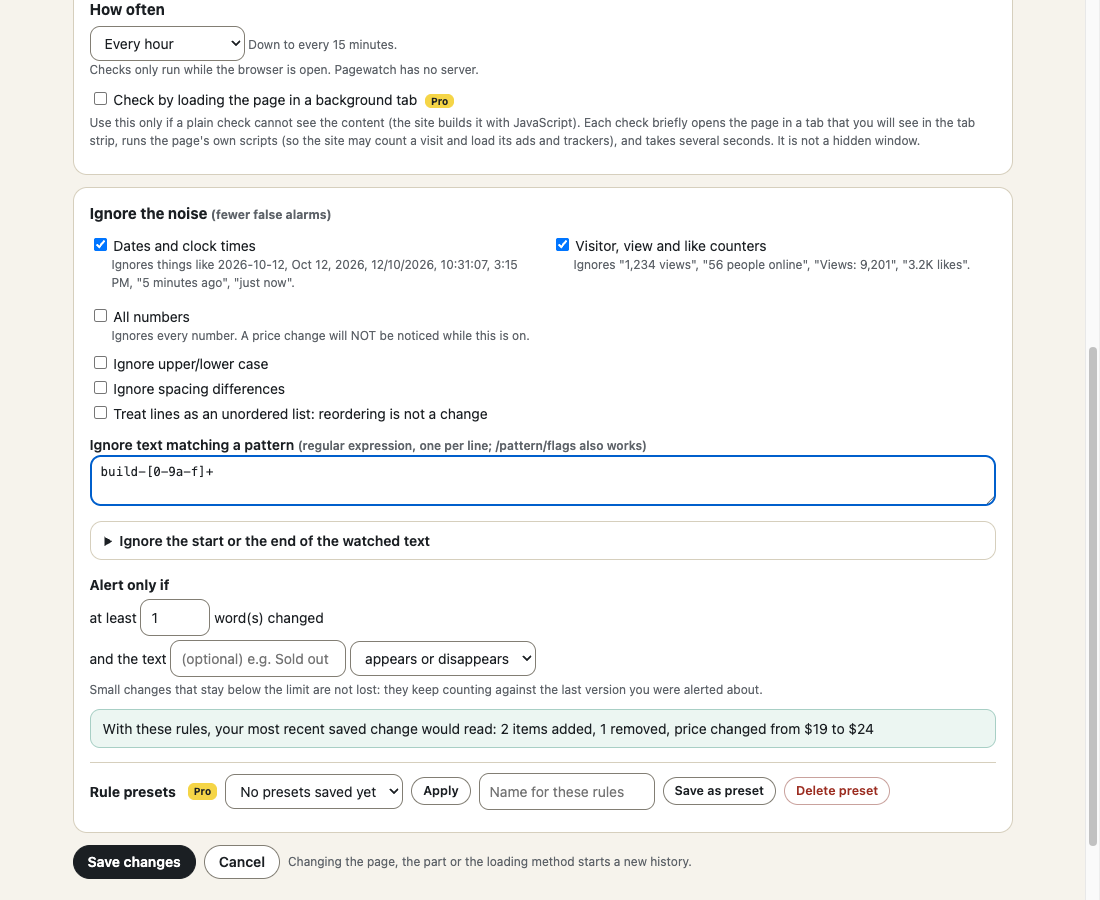
- 2. Choose how often and what to ignoreFrom every hour (every 15 minutes with Pro). Switch noise rules on or off per watch: dates and times, counters, case, your own pattern, re-ordering.
- 3. Read what changedA notification says what changed; one click opens the word-level diff, with a history and a "since I last read" view.
What it does
- A one-sentence summary of every change, plus a diff with added, removed and edited text marked (not by colour alone).
- Noise rules per watch: ignore dates and clock times, "5 minutes ago", view and like counters, upper/lower case, spacing, text matching your own pattern, the first or last lines of the region.
- Treat a list as an unordered set: re-ordering is not a change, and Pagewatch says "same items, different order".
- Alert only if at least N words changed, or only if a given text appears or disappears. Small changes are not lost: they keep counting against the last version you were alerted about.
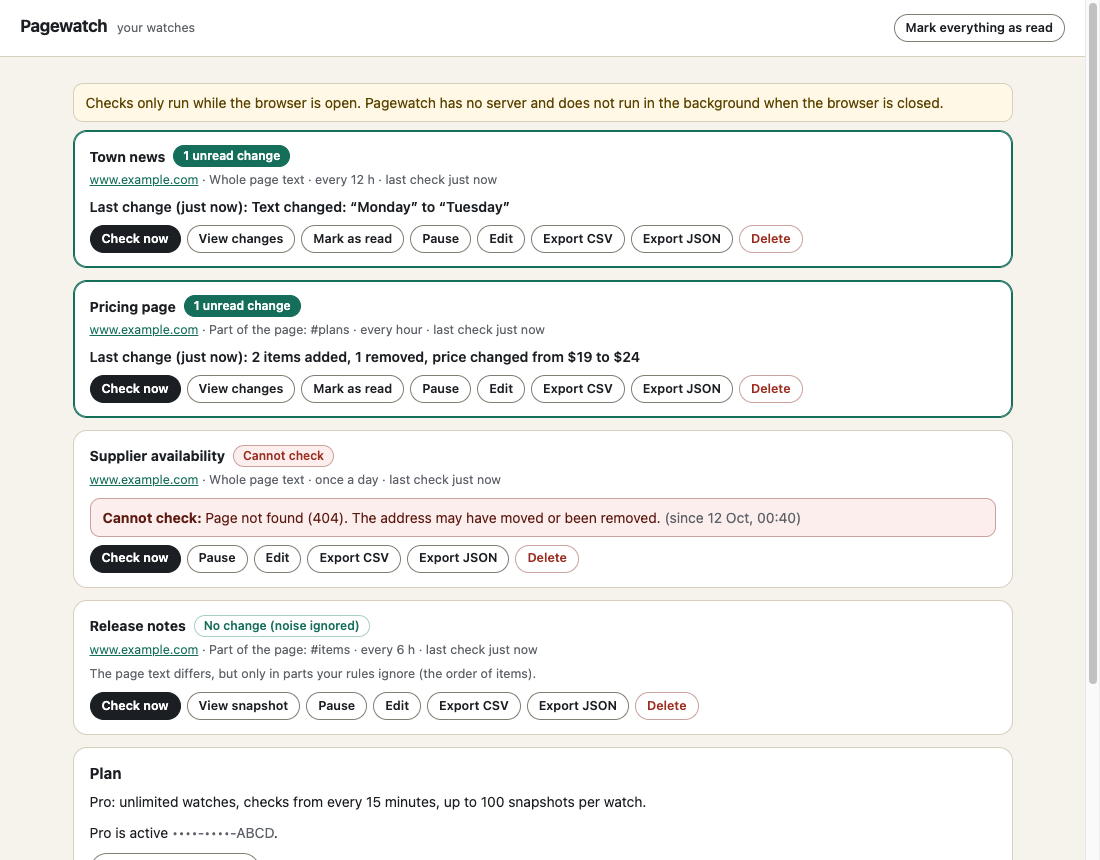
- Clear status when a check fails: page not found (404), refused (403), redirected to a sign-in page, anti-bot page, rate limit, part not found, region empty, no site access. Never a silent failure.
- Uses your own browser session, so pages you are signed in to can be checked.
- For pages that build their content with JavaScript, Pagewatch tells you the plain check cannot see it; Pro can load the page in a background tab instead.
- Snapshot history, mark as read, pause and resume, compare any two versions, export as JSON or CSV (Pro).
Free
- 3 watches
- Checks every hour or slower
- The last 5 snapshots of each watch
- Every noise rule, threshold and text condition; the full explainable diff; notifications
- No account, no ads
- Works in Chrome and Firefox
Pro $29 $14.50 once \u00b7 50% off until Oct 25
- Unlimited watches
- Checks as often as every 15 minutes
- Full history: up to 100 snapshots per watch (about 2 MB compressed per watch; the oldest go first)
- Reusable rule presets
- Background-tab checking for JavaScript-built pages
- CSV and JSON export of the history
- Works in up to 3 browsers
Thanks. Your licence key is on the receipt. In the extension click \u201cHave a Pro key? Unlock\u201d, paste it and press Unlock.
Pagewatch checks only while your browser is open; it has no server and is not a 24/7 monitor. It compares text, not images or layout. Sites that block automated requests or show verification pages are reported, not bypassed. Signed-in pages use your browser session and can stop working when the site ends that session.
Install in a minute
- Install the unzipped build (Chrome: chrome://extensions, Developer mode, Load unpacked; Firefox: about:debugging, This Firefox, Load Temporary Add-on) until the store listings are live. - At install: activeTab, scripting, storage, alarms, notifications (and offscreen in Chrome, to parse fetched pages). No site access at install. - Per site, when you start a watch: access to that site (an optional permission). Used only to fetch that address on your schedule. - No analytics, no ads, no remote code.
Chrome, Edge, Brave: unzip the file, open chrome://extensions, switch on Developer mode, press \u201cLoad unpacked\u201d and choose the folder.
Firefox: unzip the file, open about:debugging#/runtime/this-firefox, press \u201cLoad Temporary Add-on\u201d and choose manifest.json. Temporary add-ons are removed when Firefox restarts; the Add-ons listing removes that limit.
Questions
Do you store my data on your servers?
No. We do not store your data on our servers. Watches and snapshots stay in your browser. Pagewatch makes exactly two kinds of request: it fetches the pages you chose to watch (from your browser, with that site's cookies), and, only if you use a Pro key, it calls our licence endpoint (about once a day) with the key and a label like "Pagewatch Chrome". Nothing about the watched pages is sent to us.
Does it check when my browser is closed?
No. Checks run only while the browser is open. There is no server. When the browser starts again, overdue watches are checked.
Why does it ask for access to a site?
Your browser only lets an extension fetch a site after you allow it. Pagewatch asks for one site at a time, when you start a watch there. You can remove the access in the browser's extension settings.
Can it watch pages I'm signed in to?
It sends your browser's cookies for that site, so often yes. We cannot promise it for every site: sessions expire, some sites need extra verification, and we have not tested real signed-in sites. If the site sends Pagewatch to its sign-in page, the watch says so.
The page builds its content with JavaScript. Will it work?
Pagewatch detects when the watched part is missing or empty in the page as the site sends it and tells you. With Pro you can turn on background-tab checking for that watch: each check opens the page in a tab for a few seconds, which runs the site's scripts (the site may count a visit and load its ads) and then reads the result.
How does it avoid false alarms?
Dates, times and counters are ignored by default, you can ignore your own patterns, list re-ordering can be ignored, and you can require a minimum number of changed words or a specific text appearing or disappearing. Each result says what was ignored. These are heuristics: tell Pagewatch if you want numbers or dates counted by switching the rule off.
What is the difference between Free and Pro?
Free: 3 watches, hourly checks, last 5 snapshots each, all noise rules. Pro ($29 once): unlimited watches, checks from every 15 minutes, up to 100 snapshots per watch, reusable rule presets, background-tab checking, CSV/JSON export.
Chrome or Firefox?
Both are built from one codebase. Chrome is tested in an automated end-to-end run; the Firefox build has not been run yet.
Chrome and Firefox?
Both. The Chrome Web Store and Firefox Add-ons listings are in review, so for now you can install the files from this page in a minute.
See the privacy policy and terms. Pagewatch is an independent tool and is not affiliated with any website it works on.