
Download the images on a page as a tidy ZIP, with names you chose and a list of what came from where.
Imagepack finds the pictures a page shows or loads later, lets you filter and pick them, drops duplicates, names every file from a template you control, and writes manifest.csv and failures.csv next to the images. It runs in your browser. We do not store your data on our servers.
We do not store your data on our servers. Free, no account. Store listings are in review; install from the files in about a minute (steps below).
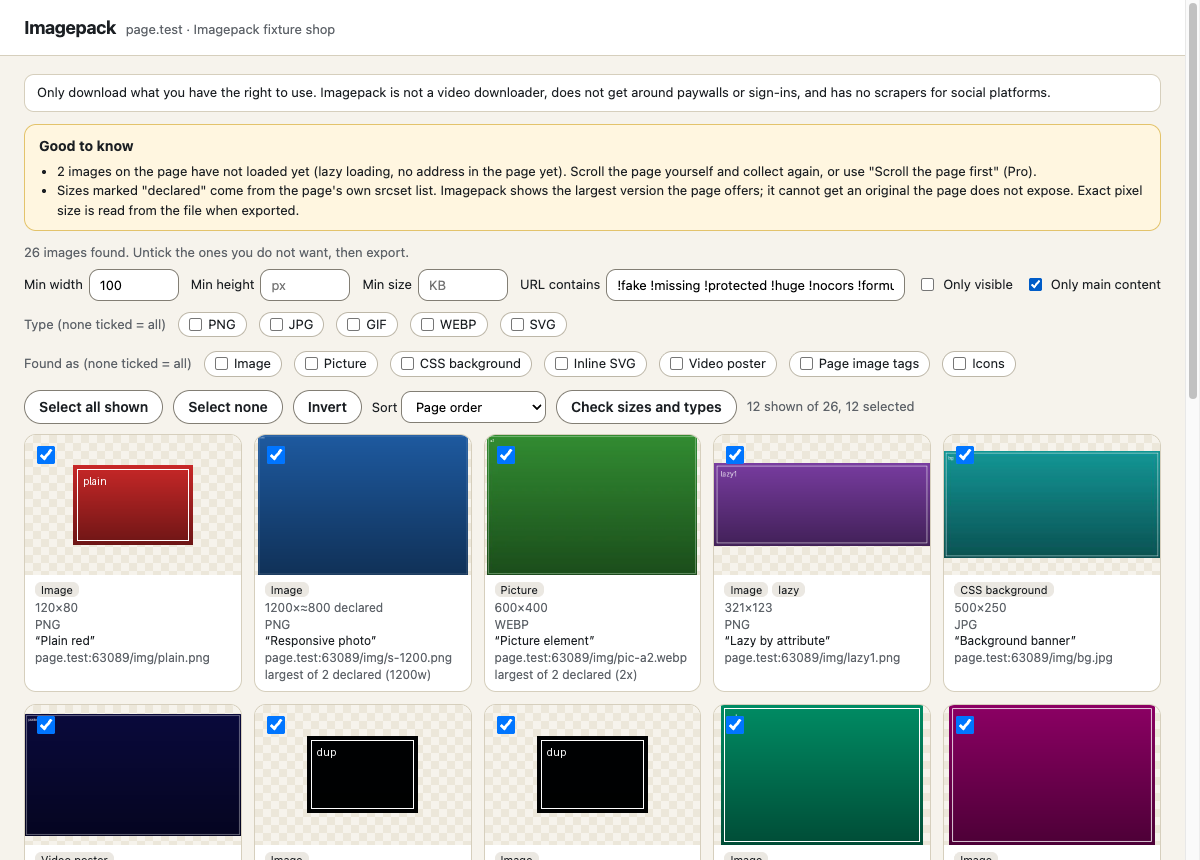
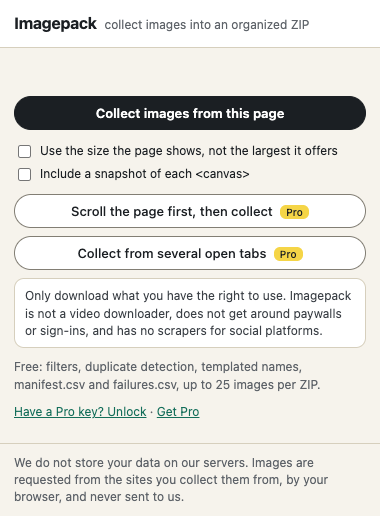
- 1. Open a page and click ImagepackIt lists every image it can find, with size, type, alt text and where it sits on the page.
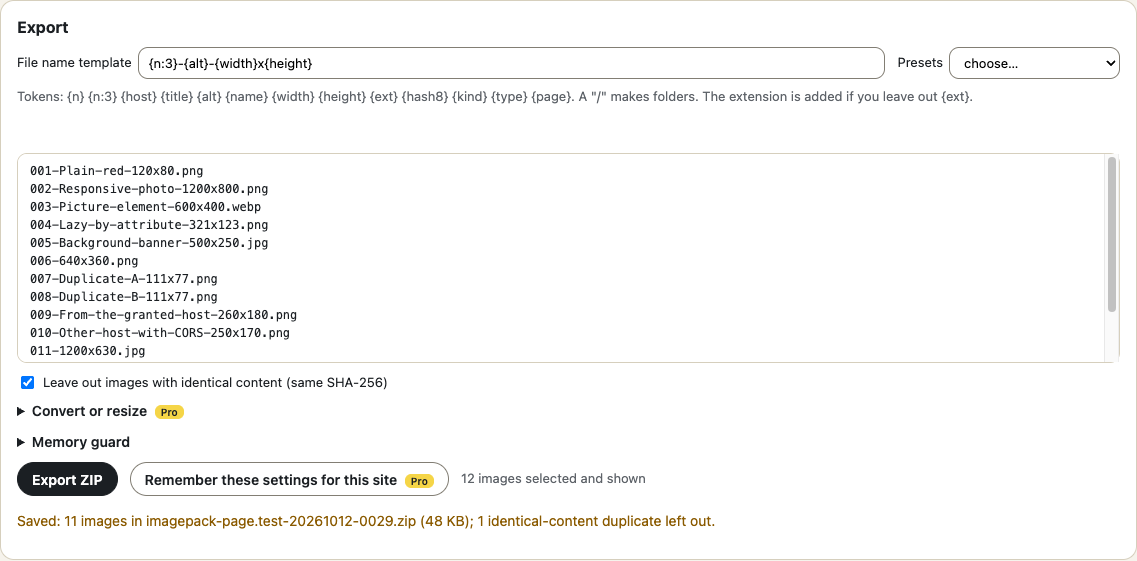
- 2. Filter and pick: minimum size, type, only the main content, URL patterns, duplicates removedCheck the file names in the preview.
- 3. ExportYou get a ZIP of the images plus manifest.csv (page, image address, alt text, size, SHA-256, status) and failures.csv for anything that could not be fetched.
What it does
- Finds images in img and srcset, picture, lazy-loading attributes, CSS backgrounds, video posters, inline SVG, og:image and twitter:image, favicons, same-site iframes, and canvas snapshots on request.
- Shows the largest version the page declares and says so; it never claims an original the page does not expose.
- Filters by size, type, visibility, main content and URL pattern; sorts by width, area or file size.
- Detects duplicates by address and by content (SHA-256).
- Names files from a template ({n}, {host}, {title}, {alt}, {width}x{height}, {ext}, {hash8}), with safe characters, length limits and collision handling, and shows the names before you export.
- Builds the ZIP in your browser; failed downloads are listed with a reason, never dropped silently.
- Tells you what it will not do: no video downloads, no paywall or sign-in bypass, no social-platform scrapers. A reminder to only download what you have the right to use is in the popup and the gallery.
Free
- Collect, review, filter, de-duplicate, name and export, up to 25 images per ZIP
- Templated names with preview, manifest.csv and failures.csv
- Page-context fetching for the site you are on; optional access for other hosts, asked only when you export
- A clear memory guard instead of a crashed tab
- Works in Chrome and Firefox
Pro $29 $14.50 once \u00b7 50% off until Oct 25
- No limit on images per ZIP (the memory guard still applies)
- Saved naming and filter recipes per site
- Convert to PNG, JPEG or WebP with quality, and resize to a maximum edge
- Several open tabs in one batch, one folder per page
- Automatic scrolling to load lazy images before collecting
- Works in up to 3 browsers
Thanks. Your licence key is on the receipt. In the extension click \u201cHave a Pro key? Unlock\u201d, paste it and press Unlock.
Install in a minute
- activeTab and scripting: read the page you click Imagepack on. - storage: your naming template, settings, and the temporary list handed to the review page. - Optional access to other sites: asked only when you press Allow access in the export prompt (the hosts are named), or to list all open tabs for a Pro batch. - Chrome and Firefox (Manifest V3). Firefox 128 or newer.
Chrome, Edge, Brave: unzip the file, open chrome://extensions, switch on Developer mode, press \u201cLoad unpacked\u201d and choose the folder.
Firefox: unzip the file, open about:debugging#/runtime/this-firefox, press \u201cLoad Temporary Add-on\u201d and choose manifest.json. Temporary add-ons are removed when Firefox restarts; the Add-ons listing removes that limit.
Questions
Do you store my data on your servers?
No. Imagepack reads the page and requests the image addresses you selected from the sites that host them, in your browser, and builds the ZIP there. Nothing about the pages or images is sent to us. The only call to us is the Pro licence check (the key and an install id), when you unlock, release, or about once a day.
Can it download videos, or images behind a login or paywall?
No video downloading and no paywall bypass. It can only fetch what your browser is allowed to fetch for you; if a site refuses (403, sign-in needed), the image goes in failures.csv with the reason.
Does it work on Instagram, Pinterest, X or TikTok?
There are no platform-specific scrapers and none are planned. On any page it only sees what the page puts in front of the browser.
Will I get the original, full-size image?
Only if the page offers it. Imagepack picks the largest version the page declares (for example in srcset) and labels it; thumbnails stay thumbnails. The manifest records the real pixel size of each file.
Why does it ask for permission to other sites?
Images hosted on other sites can only be read if that site allows it. When you press Export, Imagepack lists exactly those hosts and asks for access to them only if you press the button. You can export without it; those images are then listed as failed. You can remove the access in your browser settings.
What are the limits?
Free: 25 images per ZIP. All plans: one ZIP holds up to 800 MB by default (adjustable up to 3000 MB; no ZIP64) and 65,534 files; larger images are listed in failures.csv so you can export them in a second batch.
What does it miss?
Images drawn by WebGL, CSS content:url(), closed shadow DOM, cross-origin iframes the browser will not let it read, video frames, and lazy images that load only on interaction. If lazy images have not loaded, it says how many it noticed.
Does converting lose anything?
Converting re-encodes the pixels: metadata such as EXIF is dropped, an animated GIF keeps its first frame, JPEG has no transparency. Originals are kept unless you choose a format or a size.
Chrome and Firefox?
Both. The Chrome Web Store and Firefox Add-ons listings are in review, so for now you can install the files from this page in a minute.
See the privacy policy and terms. Imagepack is an independent tool and is not affiliated with any website it works on.